
Blog
Opening the inventory on Steam for exchange: instructions

What Is Steam Inventory and How to Open It for Trading
Steam inventory is a virtual storage that contains all in-game items you’ve earned, purchased, or traded with other users. It’s an essential part of the Steam ecosystem that enables collecting, trading, and customizing your gaming experience.Why You Need Steam Inventory
- Collecting: Many players enjoy gathering rare and unique items as a hobby.
- Customization: Skins, emotes, and cosmetic elements allow you to personalize your profile and characters, making them stand out.
- Trading: The inventory lets you exchange items with other players to earn profit or obtain desired items.
How to Open Your Inventory for Trading
To trade items on Steam, you need to make your inventory public. Follow these steps:
- Launch the Steam app and log into your account.
- Click your username in the top-right corner and select “Inventory.”
- In the new window, click the “...” button and choose “Inventory Privacy Settings.”
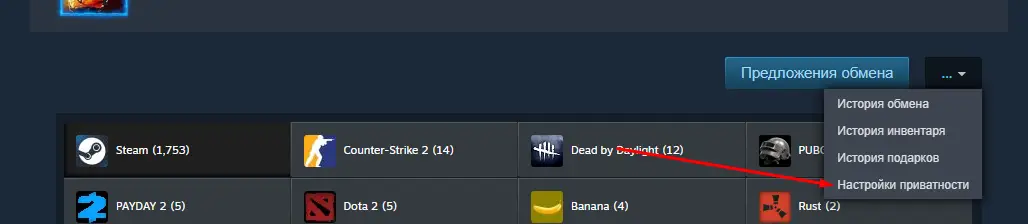
Then, check the “Public” option under the “Inventory” section.
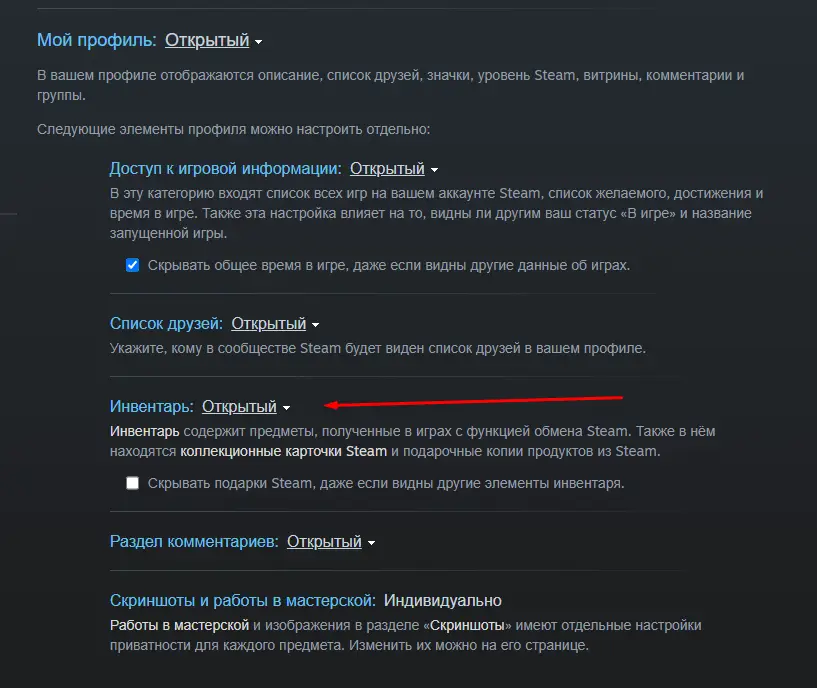
- Save your changes. It may take up to 30 minutes for them to apply.
- Your inventory is now open for trading — you can receive and send trade offers.
- To share your trade link, go to: Username → Inventory → Trade Offers → Who can send me Trade Offers?
Conclusion
The Steam inventory is more than just a list of items — it’s a gateway to trading, collecting, and personalizing your gaming experience. By opening it for trading, you join the community of players who value customization and exchange.
Keywords: steam inventory, open steam inventory, steam trade items, inventory privacy steam, cs2 inventory, cs2 items, steam trading, cs2case, cs2 site, cs2 cases